

ACHE Education Credit Guide
This guide provides an at-a-glance reference for ACHE members attending chapter education events. It outlines the types of available continuing education credits, how each type is reported, and the expected timeline for when credits will appear in your My ACHE account.
Education Guide Overview
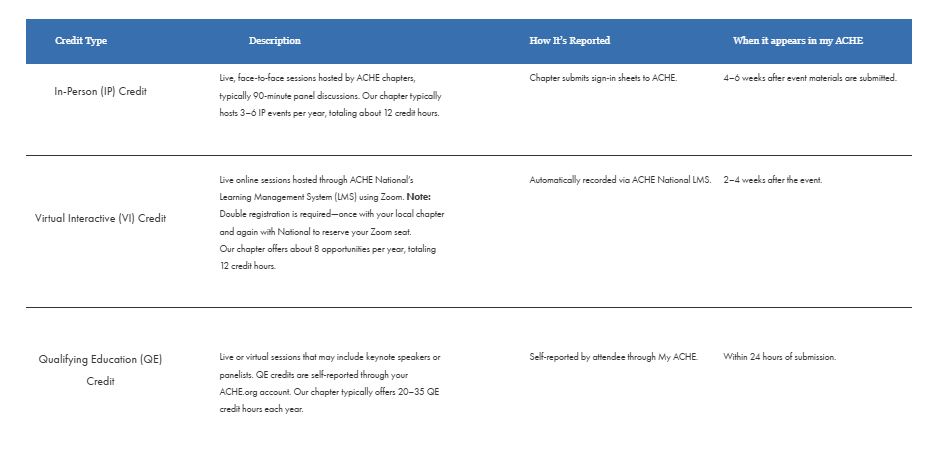
Live, face-to-face sessions hosted by ACHE chapters, typically 90-minute panel discussions. Our chapter typically hosts 3–6 IP events per year, totaling about 12 credit hours.
Credit Type
Description
How It’s Reported
When it appears in my ACHE
In-Person (IP) Credit
Virtual Interactive (VI) Credit
Qualifying Education (QE) Credit
Chapter submits sign-in sheets to ACHE.
Automatically recorded via ACHE National LMS.
4–6 weeks after event materials are submitted.
2–4 weeks after the event.
Self-reported by attendee through My ACHE.
Within 24 hours of submission.
Live or virtual sessions that may include keynote speakers or panelists. QE credits are self-reported through your ACHE.org account. Our chapter typically offers 20–35 QE credit hours each year.
Live online sessions hosted through ACHE National’s Learning Management System (LMS) using Zoom. Note: Double registration is required—once with your local chapter and again with National to reserve your Zoom seat.
Our chapter offers about 8 opportunities per year, totaling 12 credit hours.
Step by Step Guide to access Zoom Link:
1. After registering with your local chapter, complete your National ACHE registration using the link included in your confirmation email.
If you are not currently an ACHE member, you may create a free ACHE account during the registration process.
2. Log in to the My ACHE portal with the link below:
2. Under Helpful Links, select My Online Learning.
3. Click Access Your Courses to enter ACHE's Learning Management System.
4. Select My Courses.
5. Open the event you registered for from your course list.
6. Once you access the course, an automated email will be sent to you from Blue Sky eLearn containing the direct Zoom meeting link and additional event access instructions.
If you do not receive an email from Blue Sky eLearn after completing the steps above, please check your spam folders.
If you purchased tickets on behalf of other attendees, they may not receive the double registration link. Please forward the link.
How to Self-Report Qualifying Education (QE)
Follow these steps to self-report your Qualifying Education credit in your My ACHE account:
1. Sign in to your My ACHE account.
2. Select ‘My Education Credit’ from the dashboard or Helpful Links menu.
3. Click ‘Add Qualifying Education’ (or ‘Add Activity’) and fill in the program details: title, provider, date, and duration.
4. Save your entry. Credits should post within 24 hours.
Need Help?
For questions about your credit posting or event attendance,
please contact the ACHE National Organization.